Networking
Networking
Resolv
Ok, so to start i have a vague idea of what this is about... telling which namesevers to use
➜ jollof ~ cat /etc/resolv.conf
# Generated by resolvconf
nameserver 192.168.1.1
nameserver fe80::b219:21ff:fe17:61ef%enp45s0f3u2u2
options edns0
Ahhhh so apparently a link local address is typically a 1-to-1 address, which kind of makes sense when networking is broken and I always end up seeing the 169.xxx style addresses
Accoridng to wiki, the link local addresses are
- ipv4
169.254.0.0/16
- ipv6
fe80::/10
So...
- the ipv6 nameserver above is a link local address ^
- Can also see the
enp45s0f3u2u2 in the address is the network interface
And the options edns0 is extremely boring but RFC2671 is... some DNS message extension from the original schema in 1980? honestly no idea not relevant
so apparently systemd-resolved adds DNSSEC validation amongst caching and other things
I CBA to understand DNSSEC properly, the only valid info I think i need is here on cloudflare. adds some more DNS record types like RRSIG, DNSKEY, DS, NSEC, CDNSKEY?
So without customising network manager, it will use its own internal DNS resolution, like the one above printed ^
If using network manager and not sure how it was configured (should always be obvious with nixos but anyway). Nmcli does provide some ways to query
➜ jollof dev-setup (main) ✗ nmcli connection show --active
NAME                UUID                                  TYPE      DEVICE
Wired connection 1  bc3e9c81-f092-3c97-986b-7e9576a0a9f7  ethernet  enp45s0f3u2u2
lo                  0043af43-f1e7-4beb-994a-1b219eb3c8f9  loopback  lo
➜ jollof dev-setup (main) ✗ nmcli device show | grep --ignore-case dns
IP4.DNS[1]:                             192.168.1.1
IP6.DNS[1]:                             fe80::b219:21ff:fe17:61ef
➜ jollof dev-setup (main) ✗
Ok i'm spamming claude here, but still trying to get my head round various networking tools here
Dig
Dig helps grab DNS info.
See example to trace all info to google.com. can see
- it went via the router (
192.168.1.1) via port 53
- apparently went via UDP (so not using EDNS0?)
➜ jollof dev-setup (main) ✗ dig google.com

; <<>> DiG 9.20.12 <<>> google.com
;; global options: +cmd
;; Got answer:
;; ->>HEADER<<- opcode: QUERY, status: NOERROR, id: 64671
;; flags: qr rd ra; QUERY: 1, ANSWER: 6, AUTHORITY: 0, ADDITIONAL: 1

;; OPT PSEUDOSECTION:
; EDNS: version: 0, flags:; udp: 512
;; QUESTION SECTION:
;google.com.                    IN      A

;; ANSWER SECTION:
google.com.             62      IN      A       142.250.140.139
google.com.             62      IN      A       142.250.140.113
google.com.             62      IN      A       142.250.140.100
google.com.             62      IN      A       142.250.140.102
google.com.             62      IN      A       142.250.140.138
google.com.             62      IN      A       142.250.140.101

;; Query time: 10 msec
;; SERVER: 192.168.1.1#53(192.168.1.1) (UDP)
;; WHEN: Sun Oct 12 13:40:18 BST 2025
;; MSG SIZE  rcvd: 135

➜ jollof dev-setup (main) ✗
There is a deliberalty configured domain dnssec-failed.org that it SHOULD fail dnssec testing on for user testing. Can see here that my route is like all good mate! and returns the IP 96.99.227.255 but cloudflare is like na DNSSEC failed!
➜ jollof dev-setup (main) ✗ dig @192.168.1.1 dnssec-failed.org

; <<>> DiG 9.20.12 <<>> @192.168.1.1 dnssec-failed.org
; (1 server found)
;; global options: +cmd
;; Got answer:
;; ->>HEADER<<- opcode: QUERY, status: NOERROR, id: 619
;; flags: qr rd ra; QUERY: 1, ANSWER: 1, AUTHORITY: 0, ADDITIONAL: 1

;; OPT PSEUDOSECTION:
; EDNS: version: 0, flags:; udp: 512
;; QUESTION SECTION:
;dnssec-failed.org.             IN      A

;; ANSWER SECTION:
dnssec-failed.org.      229     IN      A       96.99.227.255

;; Query time: 7 msec
;; SERVER: 192.168.1.1#53(192.168.1.1) (UDP)
;; WHEN: Sun Oct 12 13:43:04 BST 2025
;; MSG SIZE  rcvd: 62

➜ jollof dev-setup (main) ✗ dig @1.1.1.1 dnssec-failed.org

; <<>> DiG 9.20.12 <<>> @1.1.1.1 dnssec-failed.org
; (1 server found)
;; global options: +cmd
;; Got answer:
;; ->>HEADER<<- opcode: QUERY, status: SERVFAIL, id: 47524
;; flags: qr rd ra; QUERY: 1, ANSWER: 0, AUTHORITY: 0, ADDITIONAL: 1

;; OPT PSEUDOSECTION:
; EDNS: version: 0, flags:; udp: 1232
; EDE: 9 (DNSKEY Missing): (no SEP matching the DS found for dnssec-failed.org.)
;; QUESTION SECTION:
;dnssec-failed.org.             IN      A

;; Query time: 10 msec
;; SERVER: 1.1.1.1#53(1.1.1.1) (UDP)
;; WHEN: Sun Oct 12 13:43:13 BST 2025
;; MSG SIZE  rcvd: 103

➜ jollof dev-setup (main) ✗
Getent
I really don't get the point of this command? its a mixture of nslookup combined with a fancy cat? as everything in linux is a file? has it been replaced by something newer?
Apparently it provides a way to use NSS (name service switch?)
Can view them here
➜ jollof dev-setup (main) ✗ cat /etc/nsswitch.conf
passwd:    files systemd
group:     files [success=merge] systemd
shadow:    files
sudoers:   files

hosts:     mymachines files myhostname dns
networks:  files

ethers:    files
services:  files
protocols: files
rpc:       files
➜ jollof dev-setup (main) ✗
But I (THINK), from claude obviously, that because linux stores runtime stuffs in a database (somewhere I guess) that there are cases where the runtime state has changed, using cat wouldn't show the most up to date state.
Like these are equivalent:
➜ jollof dev-setup (main) ✗ getent passwd jollof
jollof:x:1002:100:jollof:/home/jollof:/run/current-system/sw/bin/zsh
➜ jollof dev-setup (main) ✗ cat /etc/passwd | grep jollof
jollof:x:1002:100:jollof:/home/jollof:/run/current-system/sw/bin/zsh
➜ jollof dev-setup (main) ✗
Yeah i still don't get the point. need to do another map of linux tools and modern ones like i did for cfdisk, parted etc
ss
So this (not to be confused with 🇩🇪 ss) is for socket listening.
The classique is ss -tlnp # -t = TCP, -l = listening, -n = numbers not names, -p = process
diagrams
Iptables
Ahhh, the beast. So from a high level...
Theres ALOT going on here, from mangling to prerouting and all sorts of other lovely logic.
IPtables by default uses table filter, (equivalent to iptables -t filter), so represents the three green boxes shown in this diagram
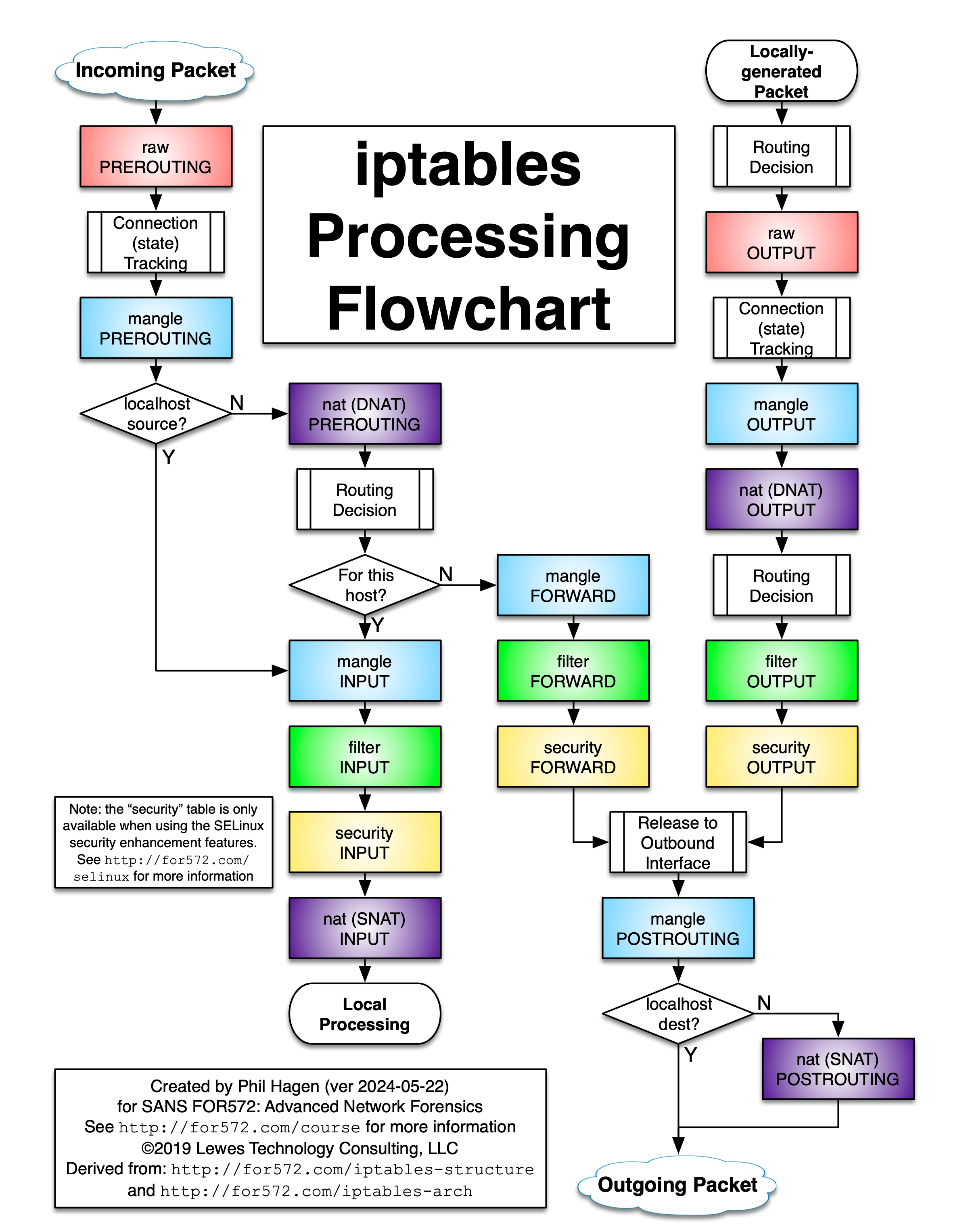
For my work desktop i'll paste the output below
➜ joelyboy dev-setup (main) ✗ sudo iptables  -L -n -v
Chain INPUT (policy ACCEPT 0 packets, 0 bytes)
 pkts bytes target     prot opt in     out     source               destination
  43M   48G nixos-fw   all  --  *      *       0.0.0.0/0            0.0.0.0/0

Chain FORWARD (policy ACCEPT 0 packets, 0 bytes)
 pkts bytes target     prot opt in     out     source               destination
    0     0 DOCKER-USER  all  --  *      *       0.0.0.0/0            0.0.0.0/0
    0     0 DOCKER-ISOLATION-STAGE-1  all  --  *      *       0.0.0.0/0            0.0.0.0/0
    0     0 ACCEPT     all  --  *      docker0  0.0.0.0/0            0.0.0.0/0            ctstate RELATED,ESTABLISHED
    0     0 DOCKER     all  --  *      docker0  0.0.0.0/0            0.0.0.0/0
    0     0 ACCEPT     all  --  docker0 !docker0  0.0.0.0/0            0.0.0.0/0
    0     0 ACCEPT     all  --  docker0 docker0  0.0.0.0/0            0.0.0.0/0

Chain OUTPUT (policy ACCEPT 0 packets, 0 bytes)
 pkts bytes target     prot opt in     out     source               destination

Chain DOCKER (1 references)
 pkts bytes target     prot opt in     out     source               destination

Chain DOCKER-ISOLATION-STAGE-1 (1 references)
 pkts bytes target     prot opt in     out     source               destination
    0     0 DOCKER-ISOLATION-STAGE-2  all  --  docker0 !docker0  0.0.0.0/0            0.0.0.0/0
    0     0 RETURN     all  --  *      *       0.0.0.0/0            0.0.0.0/0

Chain DOCKER-ISOLATION-STAGE-2 (1 references)
 pkts bytes target     prot opt in     out     source               destination
    0     0 DROP       all  --  *      docker0  0.0.0.0/0            0.0.0.0/0
    0     0 RETURN     all  --  *      *       0.0.0.0/0            0.0.0.0/0

Chain DOCKER-USER (1 references)
 pkts bytes target     prot opt in     out     source               destination
    0     0 RETURN     all  --  *      *       0.0.0.0/0            0.0.0.0/0

Chain nixos-fw (1 references)
 pkts bytes target     prot opt in     out     source               destination
 109K   44M nixos-fw-accept  all  --  lo     *       0.0.0.0/0            0.0.0.0/0
  38M   47G nixos-fw-accept  all  --  *      *       0.0.0.0/0            0.0.0.0/0            ctstate RELATED,ESTABLISHED
   13   780 nixos-fw-accept  tcp  --  *      *       0.0.0.0/0            0.0.0.0/0            tcp dpt:22
    3   180 nixos-fw-accept  tcp  --  *      *       0.0.0.0/0            0.0.0.0/0            tcp dpt:80
    1    60 nixos-fw-accept  tcp  --  *      *       0.0.0.0/0            0.0.0.0/0            tcp dpt:443
    0     0 nixos-fw-accept  tcp  --  *      *       0.0.0.0/0            0.0.0.0/0            tcp dpt:8282
    0     0 nixos-fw-accept  tcp  --  *      *       0.0.0.0/0            0.0.0.0/0            tcp dpt:22000
13880 3692K nixos-fw-accept  udp  --  *      *       0.0.0.0/0            0.0.0.0/0            udp dpt:21027
    0     0 nixos-fw-accept  udp  --  *      *       0.0.0.0/0            0.0.0.0/0            udp dpt:22000
    1    84 nixos-fw-accept  icmp --  *      *       0.0.0.0/0            0.0.0.0/0            icmptype 8
5141K 1483M nixos-fw-log-refuse  all  --  *      *       0.0.0.0/0            0.0.0.0/0

Chain nixos-fw-accept (10 references)
 pkts bytes target     prot opt in     out     source               destination
  38M   47G ACCEPT     all  --  *      *       0.0.0.0/0            0.0.0.0/0

Chain nixos-fw-log-refuse (1 references)
 pkts bytes target     prot opt in     out     source               destination
  154  9240 LOG        tcp  --  *      *       0.0.0.0/0            0.0.0.0/0            tcp flags:0x17/0x02 LOG flags 0 level 6 prefix "refused connection: "
5141K 1483M nixos-fw-refuse  all  --  *      *       0.0.0.0/0            0.0.0.0/0            PKTTYPE != unicast
  154  9240 nixos-fw-refuse  all  --  *      *       0.0.0.0/0            0.0.0.0/0

Chain nixos-fw-refuse (2 references)
 pkts bytes target     prot opt in     out     source               destination
5141K 1483M DROP       all  --  *      *       0.0.0.0/0            0.0.0.0/0
➜ joelyboy dev-setup (main) ✗
And, claude has helpfully created a diagram to show how these link together
TODO still not sure how those docker tables work? they aren't even connected?